
Dear friends,
We are happy to announce that version 5.0 of the Plum Village App is available now via the App Store for iPhone, iPad, and Mac, and via Google Play for Android phones and tablets. This is the first update of the Plum Village App in 2026, and the first major update since version 4.0 in July last year.
Version 5.0 introduces a new feature: Practice Reminders. To complement it, we have also revised the Meditations tab to help you quickly select and track your practice.
Practice Reminders
This feature has been built for those who would like to meditate regularly but would benefit from support to establish a regular practice. If you choose to enable reminders, you will receive daily reminder notifications at the time of your choice.
While other apps’ notifications can be insistent, we have designed this feature to respect your choice: reminders are only activated when you opt in. They are configurable and can be disabled at any time if you don’t find them helpful or are no longer necessary.
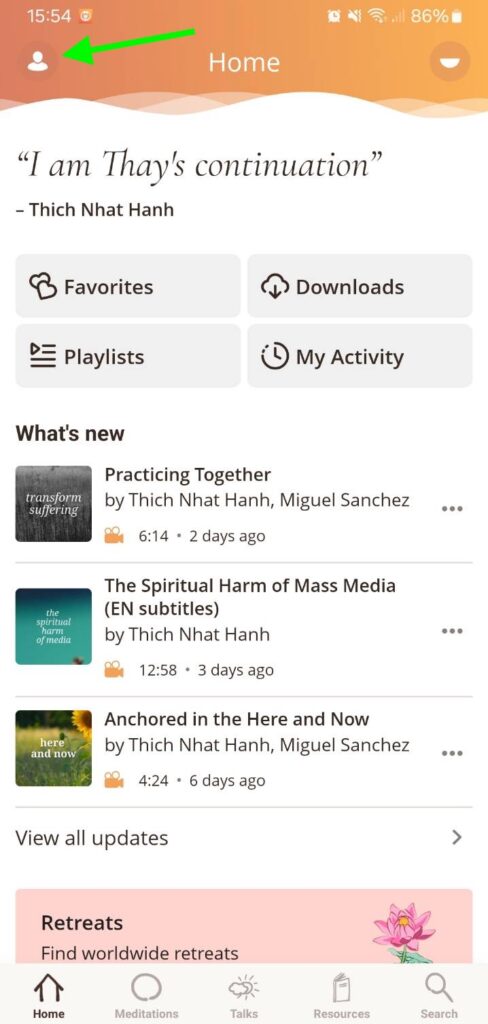
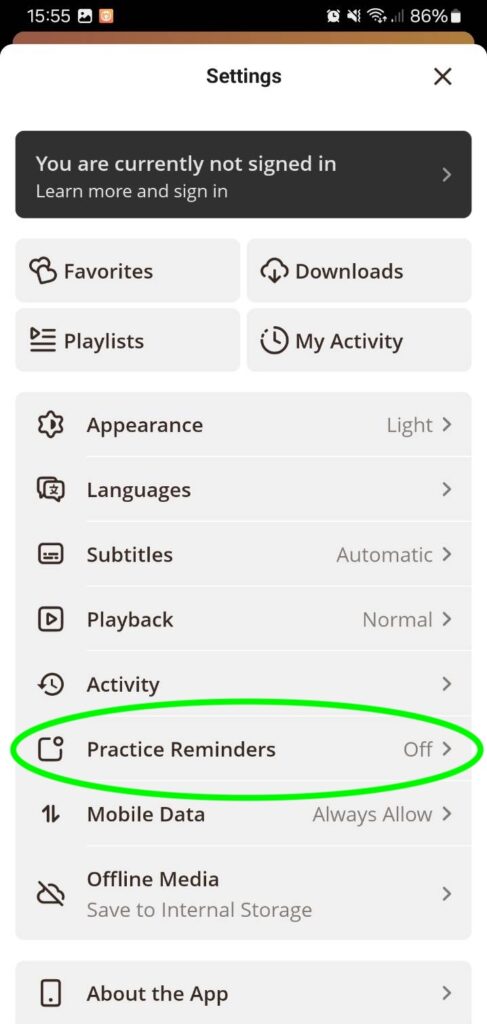
To get started, open the Settings menu (top left corner) and select Practice Reminders:
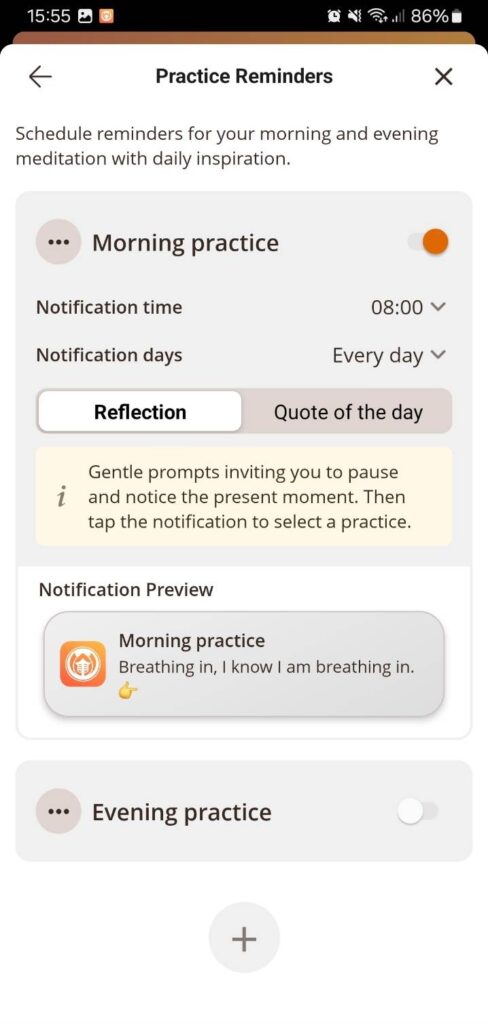
We designed the reminders based on the schedule of Plum Village retreats in France and other practice centres. On retreat, there is typically a sitting meditation at 6am, and another at 8pm. The app takes this as the basis for its reminders, but they can be easily adjusted to your needs. For example, if 6am is too early, you can change Notification Time to set up a reminder later in the morning.
You can also create additional reminders, if, for example, you would like to schedule practice for the middle of the day.
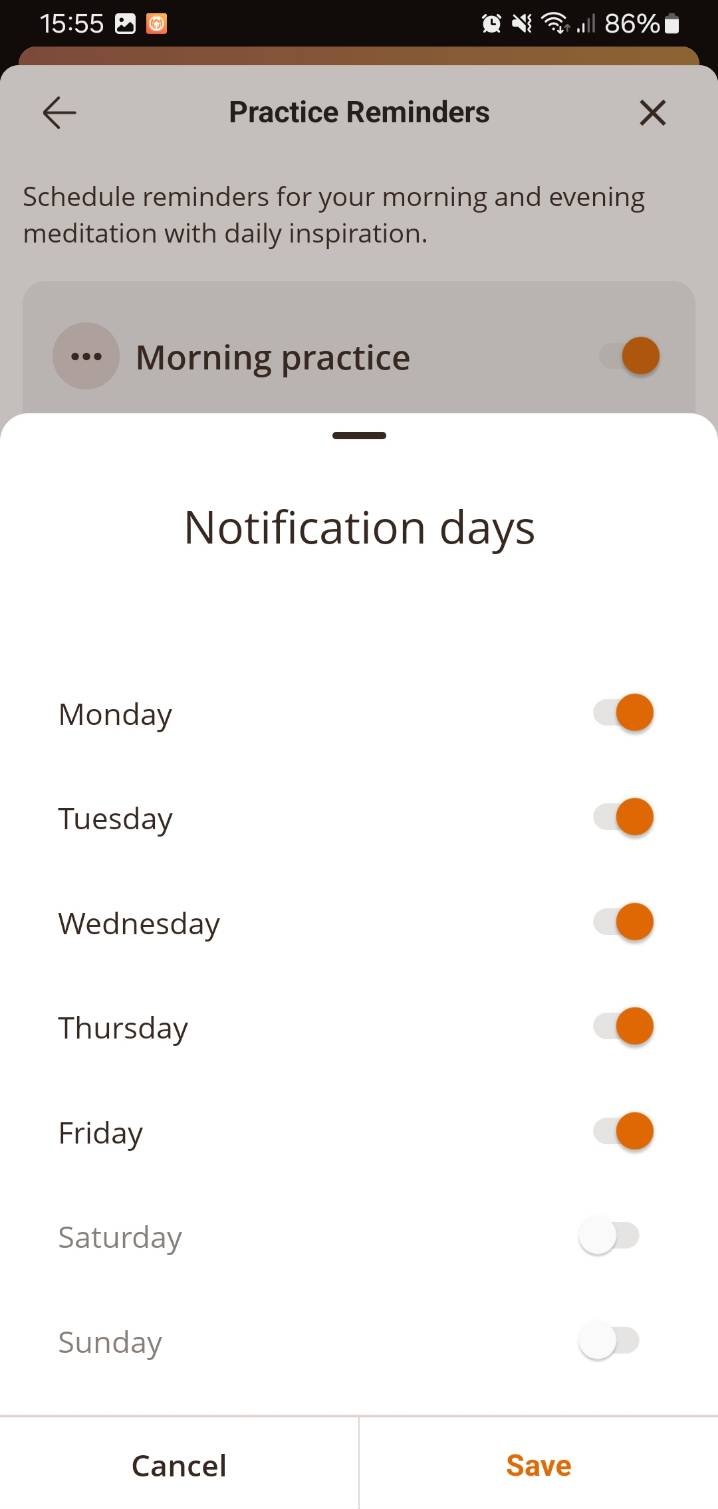
It’s also possible to select which days to receive reminders. In Plum Village, one day a week is designated as Lazy Day, with no formal practice schedule. You may like to try this, or perhaps disable reminders over the weekend; you can do so by changing Notification Days:
When you set up a reminder, you can choose to receive either ‘Quote of the Day’ or ‘Reflection’ messages. The Reflection messages give gentle prompts inviting you to pause and notice the present moment. The Quote of the Day will show the same daily wisdom on the app’s Home screen. Whichever type of reminder you choose, tapping the notification will take you to a screen of practice suggestions:
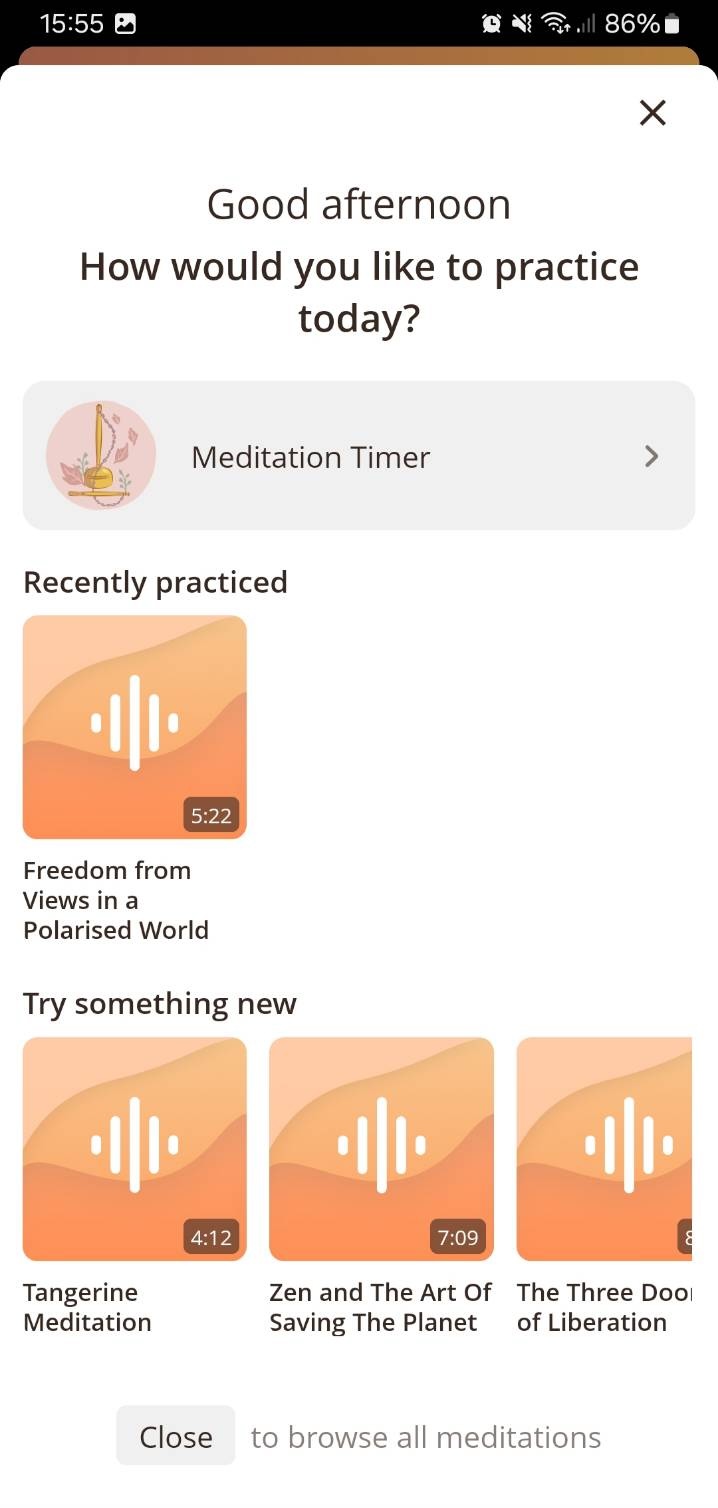
We hope you find this new Practice Reminders feature helpful. To further improve it, we welcome suggestions via our feedback board.
Practice Tracking
We have also added another new feature to help support regular practice: the app now shows the days on which you have practiced during the current week. This appears on the Meditations tab and also when you complete your first practice of the day:
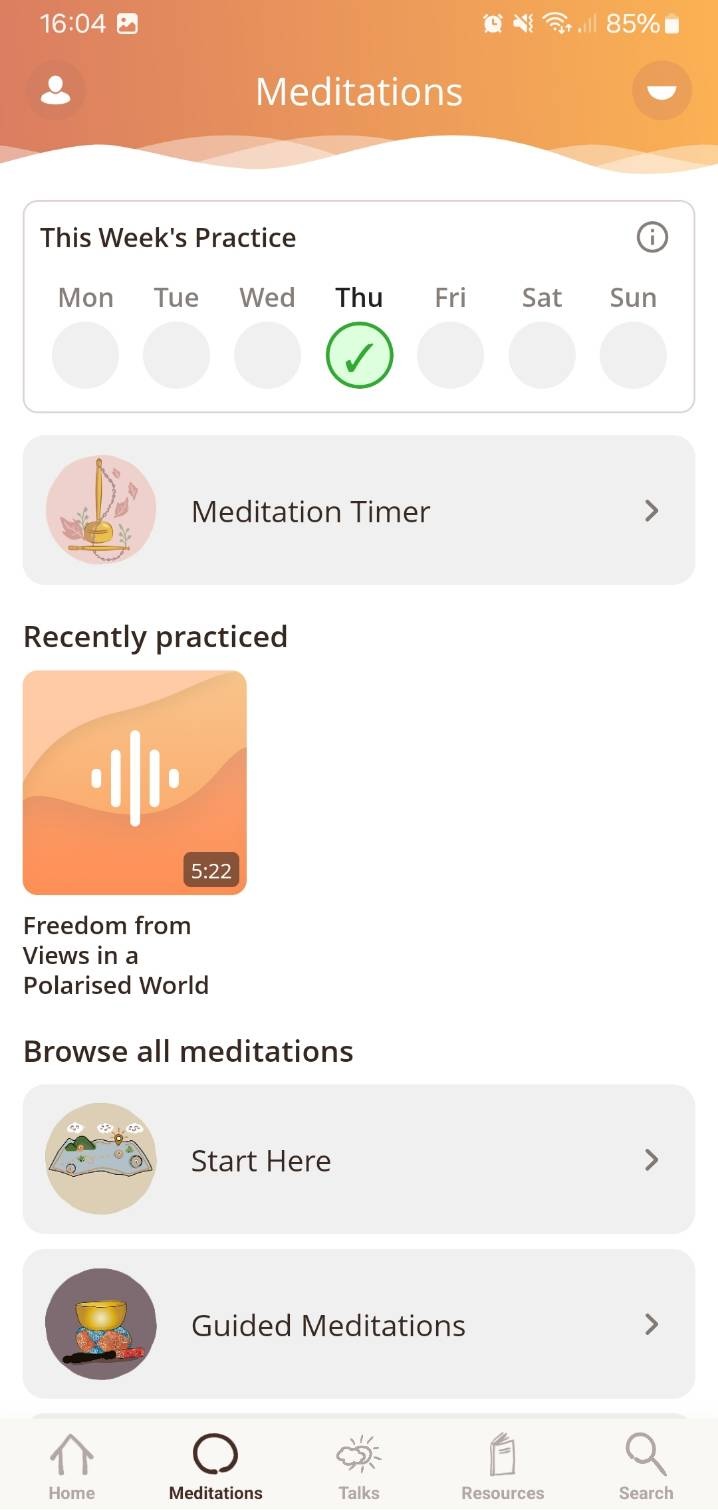
Practice Tracking should complement Practice Reminders, if you choose to enable them – but, even if not, tracking can help you to maintain a regular practice.
We recognise, however, that you may prefer not to be reminded of which days you have practiced. If so, simply disable this feature via Settings → Activity → Show practice tracking.
Revised Meditations tab
To help you quickly find a meditation for your practice, the Meditations tab now includes practice tracking, a meditation timer button, and recently practiced meditations. You can also still browse the full library of meditations below.
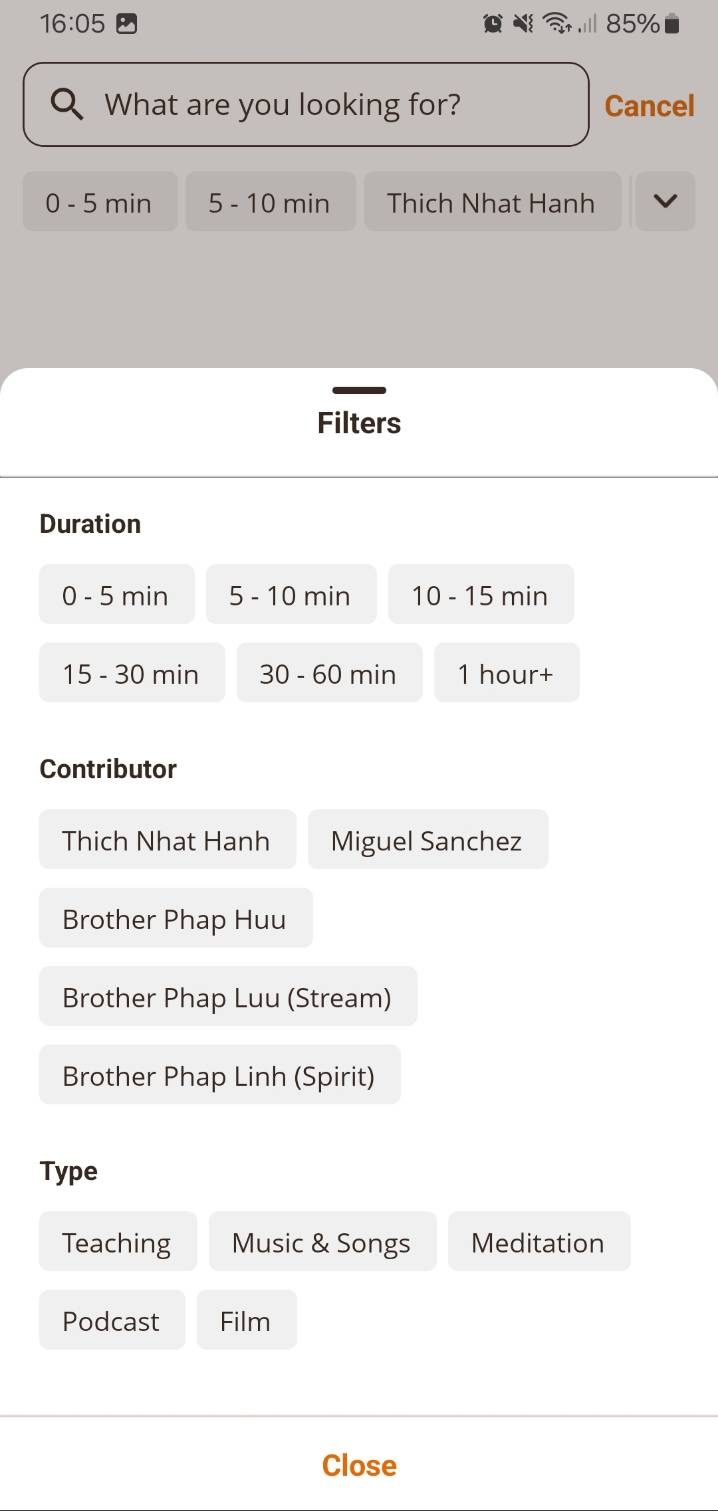
Search: filter by type
The Plum Village App content library consists of thousands of items, so we are improving how to find what you are looking for. The Search tab now includes an additional filter: ‘Type’. This allows you to narrow your search results by content type – for example, Teaching, Music & Songs, Meditation, Podcast, or Film.
Browse to collection
Sometimes, when you navigate to video, audio, or text, its location on the app may not be clear. For example, this is the case for content under ‘What’s new’ on the Home screen.
But, now, by opening the three-dot (…) menu shown next to the item, you can use the Browse option to navigate to the folder where it’s located:
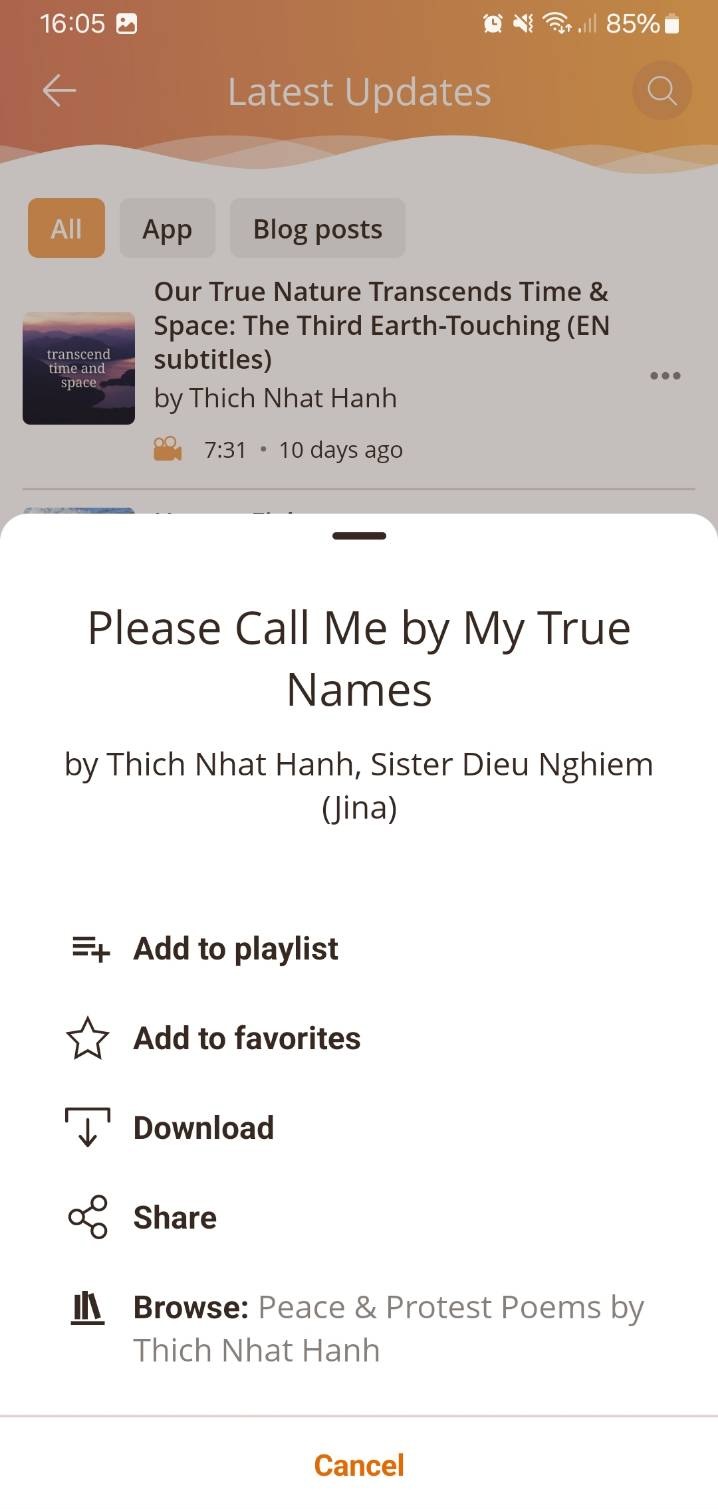
You may find this helpful to find other similar items, or to better understand an item’s context.
Other improvements in v5.0
This update includes many other small improvements and bug fixes:
- Performance of the Meditation Timer has been significantly optimized, so that it will now run more smoothly on slower devices, and reduce battery usage
- Activity Settings has been moved to the standard Settings menu, making it easier to find
- A bug which meant that Apple Health could appear to be disconnected after connecting, on iOS, has been fixed.
Continuing the development of the Plum Village App
Our small team is working at an increased pace to extend and improve Plum Village App, with three major updates offered in the past 18 months. We continue to carefully improve the app’s design and navigation, making it easier to use and more beneficial for more people, as well as adding features and content. To help guide us in this process, we invite you to offer suggestions, comments, and votes on our public feedback board – there are already many ideas which we want to work on.
In order to sustain this increased pace, please consider offering a monthly donation to support the app’s continued development and the addition of new meditations, talks, and other resources. As has been the case with Buddhist teachings for millennia, the app is freely available to all – but this is only possible because of many generous donors.
If you are enjoying the app but are unable to donate at this time, you can also support us by leaving a positive review on the App Store, Google Play, or TrustPilot.
You can also actively help our efforts by contributing subtitles in English or any other language.
If you experience any difficulties or bugs when using the app, please report these via our contact form; we will follow up by email to help.
Please stop changing things.
I struggle to find what I want since the update last year and now you’re changing it again!
Dear Dorothy, thank you for your feedback. As we are developing the app, we do keep in mind that many people become used to how it is already, and do not like things changing. Your comment is a helpful reminder of this. However, we also want to improve the app over time with new features which are also requested by regular users of the Plum Village app. So it is a balance, we try to add things in a way that causes as little disruption as possible. For this particular update, we added some new features, but we were able to avoid removing or moving anything – so I hope that you will find it less disruptive than the last update.
Thank you 🙏. I appreciate your efforts and consideration evident here.
Dear Janine, thank you for your kind sharing 🙏 With gratitude.
Thank you so much for all the hard work that has gone into making the app a reality.
I use it every morning!
Tony Maimone
St Marks Sangha
Dear Tony, thank you so much for the kind words 🙏 With gratitude.
Thank you so much. The timer uses so much battery in the background I had to stop using it, so I’m very hopeful this will solve the issue. Bless you for all your work & consideration. 🙏
I am so grateful for the hard work and dedication your team puts into this app, globally widening the Sangha circle. This app brings peace and wisdom to my life, and helps me feel connected to other souls on this life journey. So grateful! 🙏💞
Thank you for the app and your efforts to enhance/improve it. This is one of 3 apps I use daily: spotify, gmail and Plum Village!
As to adapting to changes in the app?! That is one of the tenets, no? 🤣🙏
Indeed 🙂 Thank you for this sharing, dear friend! With gratitude 🙏
First: thank you for creating and maintaining this wonderful app.. 🙏
Second: a practical question, two, actually: where can I find what is my current version? And does it auto-update?
With kind regards,
Ruud